We can't find the internet
Attempting to reconnect
Something went wrong!
Hang in there while we get back on track
Vinted's July 2026 size format update: what changed and how Dotb handles it
Starting July 7, 2026, Vinted began rolling out new size selection for multiple clothing categories. Instead of picking from a single flat list, you now choose your size according to a specific sizing standard — S/M/L, EU, UK, FR, IT, or US.
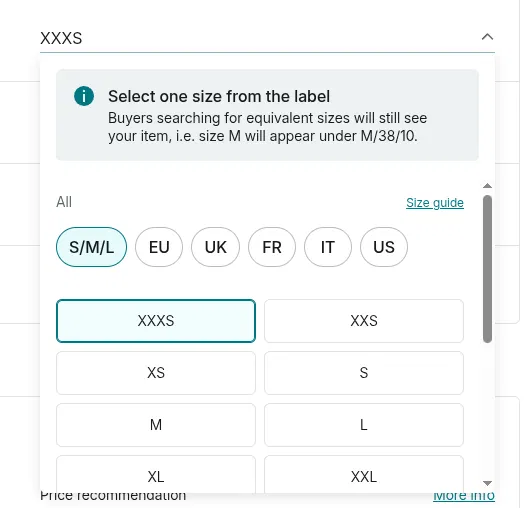
New format: pick a sizing standard first (S/M/L, EU, UK, FR, IT, US), then a plain size label.
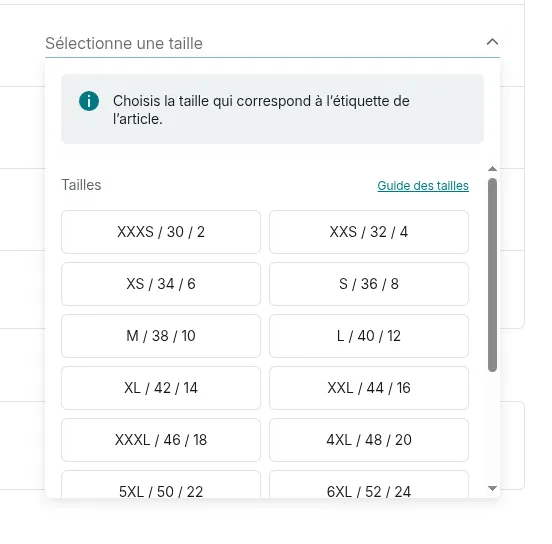
Old format: a single list, with each size shown as a combined label like "M / 38 / 10".
Not every Vinted account has switched yet — Vinted is rolling this out progressively. On Vinted itself, your account only ever shows one of the two formats, never both.
Automatic size conversion
The Dotb extension now detects which size system your account uses and converts between the new and old formats automatically — in both directions. These actions handle the size for you, whichever format your account is on:
- Reposting a sold or expired item
- Importing listings prepared in the Dashboard Listing Creator
- Importing from CSV
- The Restocker
Whether your account still uses the old combined labels or has already moved to the new standard-based selector, these actions pick the right size on your behalf — no manual conversion needed.
Creating a listing from the Dashboard Listing Creator
Dotb has no way to know in advance which format your account has, so — just like your own Vinted form would — the dashboard's size picker shows both and lets you pick the right one:
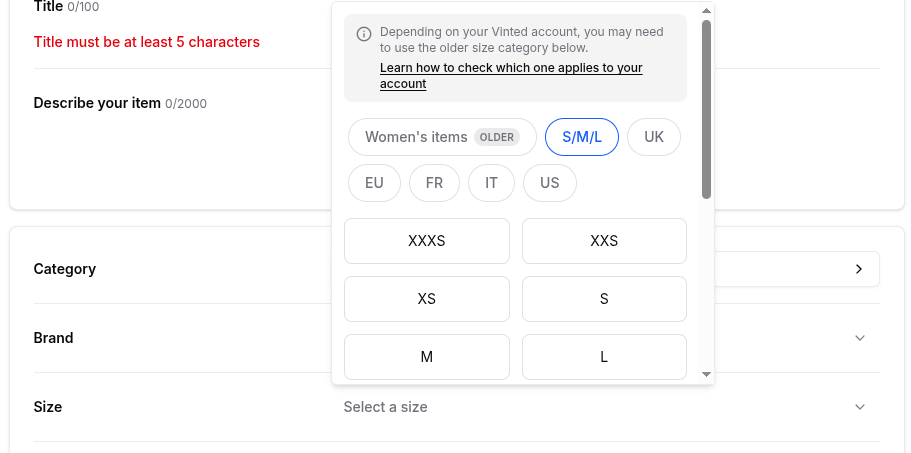
Pick whichever group matches your account. The old format is marked with an "Older" badge.
What happens if I pick the wrong one? No need to worry — when you import the listing with the extension, Dotb automatically detects your account's format and converts the size for you (see Automatic size conversion above), so the listing goes through either way.
Fixing an item's size in your extension
Vinted doesn't automatically convert the size on items you already have listed. If you try to edit one of these listings, it will show up as having no size selected — which blocks other actions like editing the price or reposting.
How to fix it: open the listing on Vinted, select the size again, and save. You can also use the extension's Bulk Edit → Edit Catalog action to fix the size on several listings at once.
Reposting no longer hits this snag — the extension now converts the size automatically (see Automatic size conversion above), so a sold item you repost later comes through with the right size. It's still worth making sure the fix is saved back into Dotb so your dashboard data stays accurate.


Selling on Vinted ?
Join 14,312+ sellers using Dotb to grow their Vinted shop.