We can't find the internet
Attempting to reconnect
Something went wrong!
Hang in there while we get back on track
Stop Your Browser From Freezing the Dotb Automation Tab
You start your reposts on several accounts at once. You come back to one of the browsers later — and it hasn't progressed at all.
Nothing is broken. The browser froze the tab while you weren't looking at it, and a frozen tab means paused automations.
😴 Why it happens
Browsers save battery by slowing down tabs that sit in the background, and sometimes putting them to sleep. Run several Vinted accounts at once and only one window can be in front — the others are exactly what gets frozen.
It happens on AdsPower, Chrome and Brave. The fix is different for each.
🌐 AdsPower
AdsPower is a multi-account browser, and it's the one I recommend for any serious multi-account Vinted operation. Create your account here with the promo code dotb.
Here's how to turn the freezing off on AdsPower:
- Click Edit on your profile
- Go to the Fingerprint tab
- Scroll to the bottom and click Show more — the field is hidden until you do
- Find Launch Args and copy in these five lines:
--disable-background-timer-throttling
--disable-backgrounding-occluded-windows
--disable-renderer-backgrounding
--autoplay-policy=no-user-gesture-required
--disable-features=CalculateNativeWinOcclusion,IntensiveWakeUpThrottling,InfiniteTabsFreezing,InfiniteTabsFreezingOnMemoryPressure
- Save, then close the profile and open it again
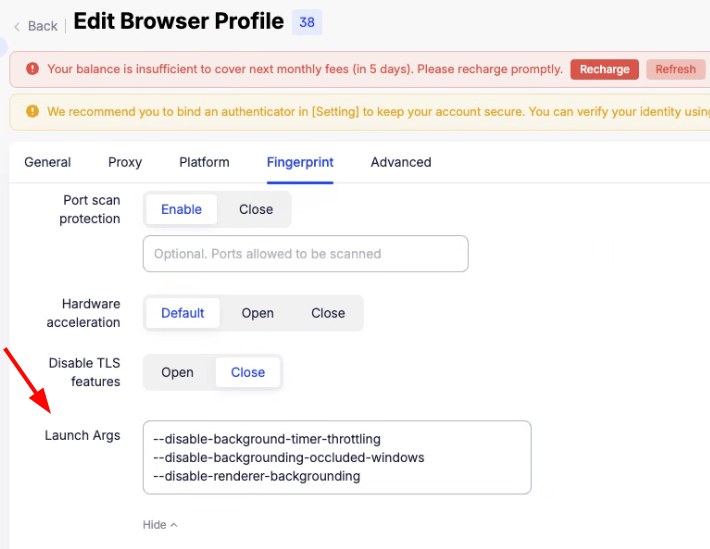
Do it in every profile — it isn't a global setting.
If you already had a --disable-features= line in that field, don't leave two of them: the second one cancels the first. Keep a single line and put all the names on it, separated by commas.
💻 Chrome & Brave
Don't minimise your Vinted windows. The most common cause by far. They can sit behind each other, they just must not be minimised — a minimised window counts as hidden whatever else you turn off.
Watch out for virtual desktops too. A window parked on another Windows virtual desktop, or another macOS Space, counts as hidden in exactly the same way as one that's covered up. The anti-freeze mode below fixes that one; nothing fixes minimised.
Check Memory Saver. Turn it off, or add your Vinted address to the Always keep these sites active list — that list doesn't only stop the tab from being closed to save memory, it also keeps it out of the freezing. It's at chrome://settings/performance, or brave://settings/?search=memory in Brave — and it isn't shared between profiles, so do it in each one.
Still freezing? Chrome and Brave have the same anti-freeze mode as AdsPower, but there's no button for it — it only works if the browser is started in a special way. So we made a small app that does it for you.
🪟 Download the Dotb launcher for Windows 🍎 Download the Dotb launcher for MacOpen it and it does the rest: it finds Chrome or Brave by itself, asks which one if you have both, and opens it in anti-freeze mode. It never closes your browser on its own.
On Windows, Chrome warns you the file "can harm your computer" — it says that for every file of this type, so choose Keep. On Mac, unzip it and drag Dotb Launcher into your Applications folder.
Open your browser with it every day. Your normal shortcut won't do the same thing.
💤 Don't let your computer sleep
A locked screen is fine. A sleeping computer stops everything, whichever browser you use.
- Windows — Settings → System → Power & battery → Screen and sleep → set Sleep to Never
- Mac — System Settings → Displays → Advanced → turn on Prevent automatic sleeping when the display is off
📱 On mobile: no option for this
Dotb works on a phone — with Yandex on Android or Orion on iPhone — but there's no anti-freeze setting on Android or iOS, and phones freeze tabs within seconds.
So keep the Vinted tab in front, keep the screen on, and stick to short sessions you keep an eye on. For long unattended runs, use a computer that stays on.
Good to know: on mobile, Dotb doesn't create your listings by filling in the Vinted form like it does on desktop — it goes through the Vinted API instead.
📋 In short
| You use | What to do |
|---|---|
| AdsPower | Add the five lines to Launch Args, in every profile |
| Chrome / Brave | Don't minimise, sort out Memory Saver, open with the launcher |
| Any computer | Don't let it go to sleep |
| Phone | Nothing to turn off — tab in front, screen on, short sessions |


Selling on Vinted ?
Join 14,312+ sellers using Dotb to grow their Vinted shop.