1. Install the Orion Browser App
First, you'll need to install a browser that supports extensions on iOS.
2. Install the Dotb Extension in Orion
Step-by-Step: Installation
- Open the Dotb Chrome Extension page in Orion.
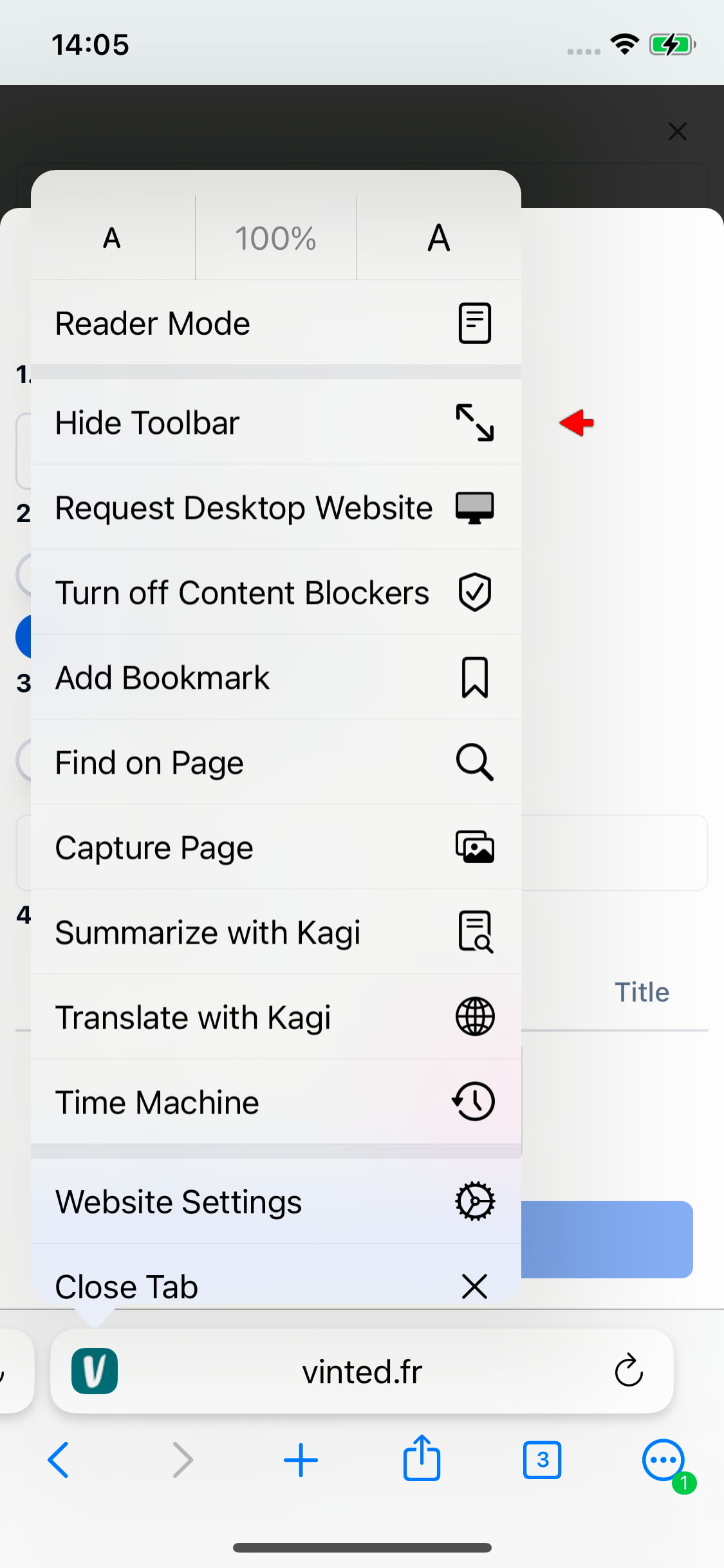
- Tap the icon in the bottom-left corner of the screen next to the address bar to open a menu.
- Select Request Desktop Website.
- Tap Add to Orion in the top-right corner.
- Confirm by tapping Add in the pop-up window.
3. Log In to Vinted and Dotb in Orion
Step-by-Step: Login
- Go to your country's Vinted website, for example: vinted.co.uk.
- Log in to your Vinted account.
- Log in to Dotb using your email and password. Don’t have an account? Register here.
- You're now ready to use Dotb on your iPhone or iPad!
Extra Tips
If you're using an iPhone with a small screen, like the iPhone 8, you can hide the toolbar by tapping the Vinted icon and selecting Hide Toolbar. This is useful for gaining more vertical space, especially when using the photo editor.
Common Issues
I can't install the extension through the Chrome Web Store. Make sure Chrome extensions are enabled in Orion's settings. Go to Settings > Advanced, and ensure the Chrome Extensions toggle is turned on.
The Dotb extension doesn’t appear on the Vinted website. Try removing the Dotb extension and reinstalling it.
What’s Next?
Explore more Dotb features to enhance your Vinted experience: