This guide will help you prepare your device for using Dotb and troubleshoot common issues.
🔧 Preparing Your Device for Smooth Performance
To ensure Dotb runs without interruptions, follow these best practices:
-
Avoid Interrupting Dotb Actions
→ While Dotb is running, avoid interacting with the window to prevent disruptions. -
Adjust Sleep Settings
→ Increase your device’s sleep timer to prevent automatic sleep from pausing Dotb's operations (e.g., sending messages). -
Ensure a Stable Internet Connection
→ Dotb requires a reliable connection. Slow internet or simultaneous high-bandwidth activities (like streaming Netflix) can cause performance issues.
🛠️ Basic Troubleshooting Steps
If you experience issues with Dotb, try these quick fixes:
1️⃣ Log Out and Log Back In
- Logging out and back in can reset settings and resolve common errors.
2️⃣ Close and Restart Your Browser
- Ensure all browser windows are completely closed before reopening.
3️⃣ Restart Your Device
- A system restart refreshes all applications and can fix many performance-related issues.
4️⃣ Uninstall and Reinstall Dotb
If problems persist, reinstall Dotb:
- Go to the Dotb Extension Page.
- Click "Remove from Chrome" → Confirm "Remove".
- Reinstall Dotb by selecting "Add to Chrome".
This often resolves persistent issues.
✅ Following these steps should help resolve most common Dotb issues so you can continue using it smoothly! 👌
🐛 How to Report a Bug
If you encounter a bug, follow these steps to help us investigate and fix it quickly:
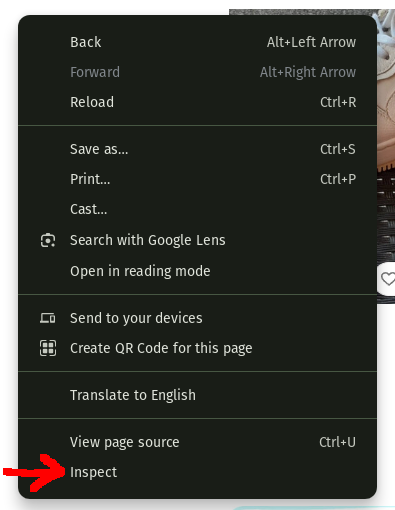
1️⃣ Open the Inspection Tool
- Right-click anywhere on the Vinted website and select "Inspect" from the menu.
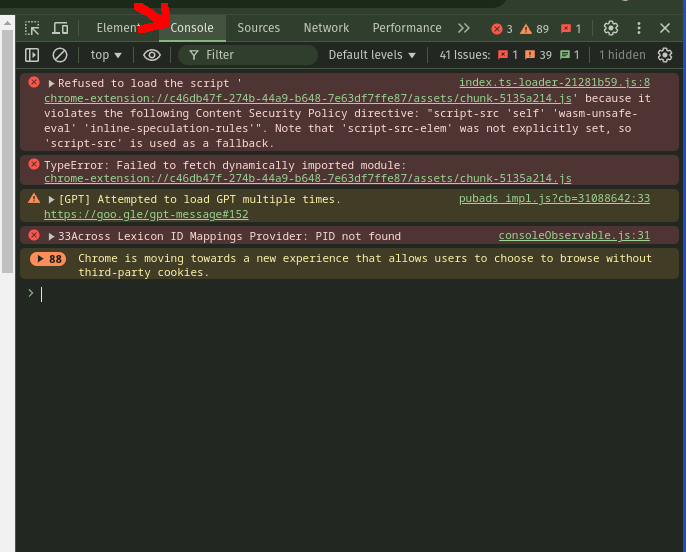
2️⃣ Access the Console
- In the Inspection Tool, click on the "Console" tab.
- You will see error messages related to the issue.
3️⃣ Take a Screenshot
- Capture a screenshot of the Console text showing the error.
4️⃣ Send the Screenshot
- Email the screenshot to hello@dotb.io or share it on our Discord.
📩 I will review the issue and get back to you as soon as possible!