Dotb allows you to automatically send messages to Vinted users who add your items to their favorites ❤️.
Why Send Messages to Users Who Favorite Your Items?
When someone adds your item to their favorites, it’s a strong signal of interest. They might be considering a purchase or waiting for a discount.
By sending a quick message—perhaps with a small discount—you increase your chances of making a sale 💸.
How Does Dotb’s "Automatic Messages" Feature Work?
Dotb scans your notifications for new favorites and automatically sends a pre-set message based on your conditions. You can choose to process favorites from the past 7 days or focus only on new notifications.
Phase 1 - Processing Past Favorites
Dotb retrieves and analyzes all your past notifications. You can decide whether to message these users or focus only on recent favorites for a faster process.
Phase 2 - Monitoring Real-Time Favorites
Every 3 minutes, Dotb checks for new favorites and sends messages when the set conditions are met.
Phase 3 - Follow-Up Messages
Some buyers don't reply right away. With Follow-Ups, Dotb checks back a few days later and sends another message — optionally with a discount offer — so silent likes get a second chance.
You set the delay and content for each follow-up. Dotb skips it if the buyer has replied, blocked you, or the item is gone, so the conversation stays clean.
Message Sending Rules
- ✅ No duplicate messages – If a favorite has already been processed, Dotb won’t message the user again.
- ✅ Limit of 1-3 messages per configured days – To prevent spamming, only up to three messages can be sent to the same user within a configurable number of days (one day by default).
- ✅ No messages if a conversation has already started – Dotb only messages users who haven't interacted with you yet, preventing unnecessary or redundant messages.
- ✅ No messages to blocked or ignored users – Users on your Ignored Users list won’t receive any messages.
- ✅ Limit messages per item – You can set a limit on how many messages can be sent per item to spread the messages across your items.
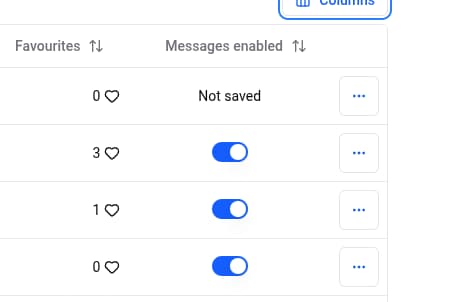
- ✅ Disable messages for specific items – You can disable auto messages for specific items in the dressing panel.
With Automatic Messages, you can engage potential buyers effortlessly and turn favorites into sales!
Vinted Notification Settings
Go to the Vinted Notification Settings page Update your notification preferences to match the example below:
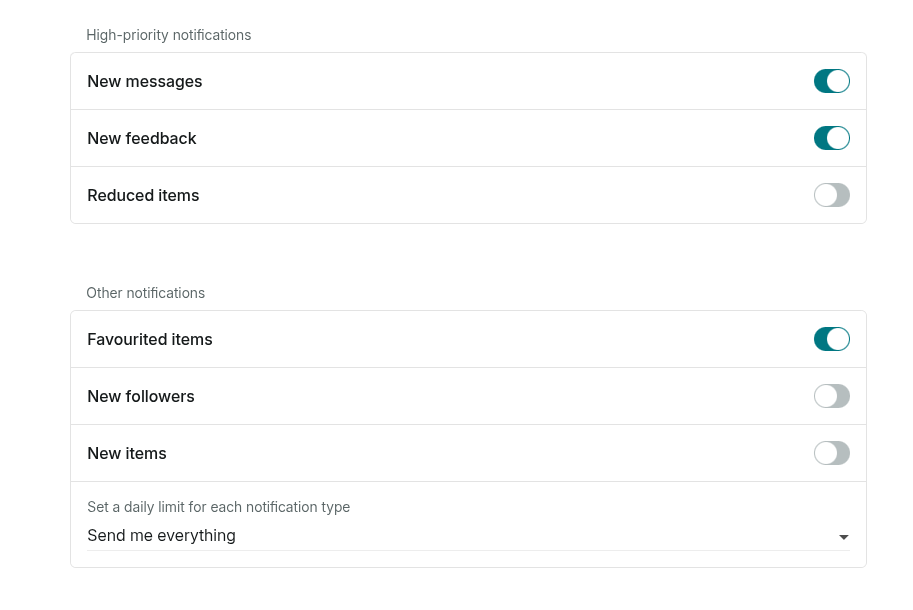
If these settings are not correctly configured, Vinted will hide some of your like notifications, and Dotb won't be able to detect them and send messages.
Disable Automatic Messages for Specific Items
In the Dressing Panel, you can disable automatic messages for specific items by toggling the "Auto Message" option. If the column is not visible, click on the column selector in the top right to enable it.